
It is 08:17 on a Monday. Three people say they cannot open their files. Someone has found a text file titled “readme” on a shared drive demanding payment. Microsoft 365 still seems to be working, but nobody is sure whether email can be trusted. The managing director is standing over a desk asking one question: should we switch everything off?
What happens in the next hour will shape the next three weeks. And here is the uncomfortable truth we have seen play out many times: the quality of the first few decisions usually matters more than the speed of random action. Panic is understandable, but panic is also how a contained problem becomes a company-wide one.
Well-meaning people make incidents worse every day. They reboot the affected machine “to see if it clears”. They delete the suspicious email before anyone has looked at the headers. They wipe a laptop that held the only evidence of how the attacker got in. They reset every password at once and lock out the very accounts needed to investigate. They discuss the incident over the same email system the attacker is sitting inside. They restore last night’s backup before anyone has worked out whether the attacker was already present last night. They ring the wrong people, or nobody. They forget to write anything down, so three days later no one can say what was actually done. And they assume that getting the server running again is the same as putting the business right, when the legal, financial and customer consequences have barely started.
This guide is written to help you avoid all of that. It sets out what to do in the first 15 minutes, the first hour, the first day and the first 72 hours of a cyber incident, then how to recover properly and learn from it. It is aimed at UK businesses of roughly 10 to 250 people, though the principles hold at any size. It is deliberately practical. You can read it start to finish, or jump straight to the checklist you need. And there is a free, editable toolkit at the end that turns this advice into documents your team can actually use.
We are System Force IT, a Gloucestershire-based managed IT and cyber security provider, UKAS ISO/IEC 27001:2022 certified and supporting UK businesses since 2006. We have sat in rooms exactly like the one above. This guide leans heavily on official UK guidance from the National Cyber Security Centre (NCSC) and the Information Commissioner’s Office (ICO), interpreted for a smaller business that does not have a 24-hour security team.
- If you’re dealing with an incident now
- What counts as a cyber incident
- Response is not disaster recovery
- The incident response lifecycle
- Preparation before an incident
- Who does what: incident roles
- Severity and escalation
- The first 15 minutes
- The first hour
- Hours 1 to 4
- The first 24 hours
- The first 72 hours
- Reporting an incident
- Preserving evidence
- Communicating during an incident
- Six practical playbooks
- Recovery: don’t rush back online
- The post-incident review
- Testing the plan
- The free toolkit
- Frequently asked questions
If you are dealing with a cyber incident right now
Do these first, in order
- Stop and take a breath. You have more time than it feels like. The wrong fast action can destroy the evidence you will need and make recovery slower, not quicker.
- Start writing things down. Open a notebook or a document on a device you trust and record the time now, what you have seen, and who is involved. Every action from here gets a timestamp.
- Isolate, don’t wipe. If a device looks compromised, disconnect it from the network (unplug the cable, turn off its Wi-Fi) but leave it switched on where you can. Do not reformat it, do not “clean” it, and do not reconnect it.
- Assume email may be listening. If there is any chance your email or Teams is compromised, coordinate by phone or a messaging app on personal devices, not over the systems that might be affected.
- Protect the money. If the incident touches finance, invoices or bank details, pause all payments and warn your finance team and your bank. Confirm any bank-detail change by phone to a known number, never by replying to an email.
- Get the right people in the room. Nominate one person to lead. Call your IT provider or internal IT lead. If you have cyber insurance, check whether your policy requires you to call their incident line before you engage anyone else, because some policies do.
- Don’t broadcast yet. Tell staff what to stop doing, but hold off on public statements until you understand what has actually happened.
This is first-aid, not a diagnosis. Generic web guidance cannot replace advice tailored to your specific incident. If the situation is serious, get experienced help early. You can also report to the NCSC at ncsc.gov.uk/report.
Dealing with a live incident and need help?
If you are a UK business facing an active cyber incident, talk to our team about containment and recovery support. If it is out of hours and urgent, follow your cyber insurer’s incident line first where your policy requires it.
Contact System Force ITWhat counts as a cyber incident?
“Cyber incident” sounds dramatic, but most are mundane at the start: a login that shouldn’t have worked, a file that will not open, an invoice that turns out to be fake. An incident is simply any event that may harm the confidentiality, integrity or availability of your systems or data, or that breaches your security policy. It does not have to involve a sophisticated attacker. A member of staff emailing a spreadsheet of customer records to the wrong person is an incident too.
Common examples we see in UK SMEs:
People and accounts
- A compromised email account (someone logged in as a member of staff)
- A successful phishing message that harvested a password
- Business email compromise, where an attacker sits in a mailbox and intercepts invoices
- Exposed or reused credentials found in a data dump
- Insider activity, whether malicious or careless
- A payment diverted to a fraudulent bank account
Devices, systems and data
- Malware or ransomware on one or more machines
- A lost or stolen laptop or phone
- Unauthorised access to a server or cloud platform
- A Microsoft 365 tenant compromise
- A website defacement or injected malicious code
- Suspected data theft, or accidental disclosure of personal data
- A denial-of-service attack that takes a service offline
- A supplier or software provider that has been breached
It helps to be precise about the words, because the same messy morning can be described in several ways and each has different consequences:
| Term | What it means | Everyday example |
|---|---|---|
| Event | Anything that happens on a system. Most are harmless. | A user signs in from home. |
| Alert | Something a tool or person has flagged as worth a look. | Sign-in from an unusual country. |
| Incident | An event confirmed or suspected to be harmful, that you decide to respond to. | That sign-in succeeded and mailbox rules were changed. |
| Breach | An incident where a security control has actually failed. | The attacker read and forwarded emails. |
| Personal data breach | A breach affecting personal data specifically. This is the type with legal reporting duties under UK GDPR. | Those emails contained customers’ personal details. |
| Major incident | An incident serious enough to disrupt the business and need coordinated, senior-level response. | Ransomware has spread across the file server and half the estate. |
The distinction between an “incident” and a “personal data breach” matters a great deal, because it decides whether the clock in section 12 starts ticking. We will come back to it.
Incident response is not the same as disaster recovery
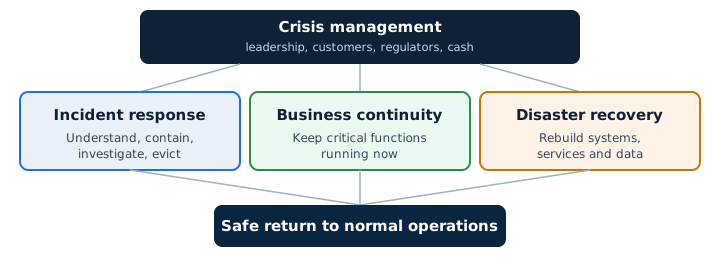
These four disciplines get muddled constantly, and the confusion is expensive. During a serious incident you need all four running at once, led by people who understand which is which.
Incident response
Work out what happened, control it, investigate it and remove the threat. This is the security job: understanding the attacker and shutting them out.
Business continuity
Keep the critical parts of the business working while the disruption continues. This is the operational job: how do we still take orders, pay staff and serve customers today?
Disaster recovery
Restore systems, services and data to working order. This is the technical rebuild: servers, applications, files, connectivity.
Crisis management
Manage the strategic consequences: people, customers, reputation, regulators, insurers, cash. This is the leadership job, and it usually outlasts the technical work.
Here is the trap. A business fixates on disaster recovery (“just get the server back”) and neglects the others. It restores from a backup that still contains the attacker’s foothold, reinfects itself, and meanwhile says nothing useful to staff or customers and misses a regulatory deadline. Restoring the server is not the same as recovering the business.
The incident response lifecycle
Frameworks vary, but a workable model for a UK SME has nine stages. Think of them as a checklist of things that need to happen, not a rigid production line. In real incidents you loop back constantly: an investigation in stage 5 often uncovers another affected system and throws you back to containment in stage 4.
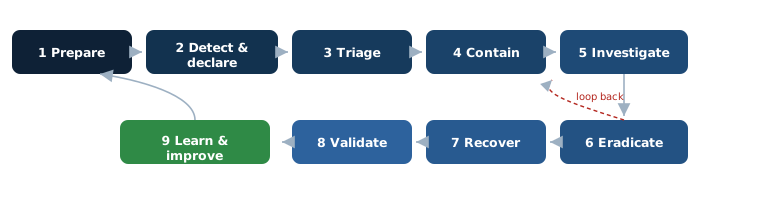
The rest of this guide walks through these stages in the order you will actually hit them under pressure, starting with the preparation that makes everything afterwards easier.
Preparation before an incident
Almost everything that goes wrong in a live incident traces back to a decision that could have been made in advance, calmly, with a cup of tea. Preparation is not glamorous, but it is the single biggest lever you have. Four things are worth getting right.
Know what actually matters
You cannot protect or recover everything at once, so decide now what has to come back first. List your critical systems and rank them. For most UK SMEs the list includes identity (the accounts everything else depends on, usually Microsoft 365 or Entra ID), email, your finance and payment systems, your main line-of-business application, customer systems, internet connectivity, telephony, your backups and your cloud platforms. Note your critical suppliers too, and take special care over privileged accounts, the admin logins that can change anything. If an attacker controls your identity platform, they effectively control the lot, which is why it sits at the top of nearly every recovery plan.
Know where your logs are, before you need them
When you are trying to work out what an attacker did, logs are your memory. The problem is that many logs roll off after a few days, so if an incident is discovered two weeks later the evidence has already gone. Know now what you record and for how long: identity and sign-in logs, Microsoft 365 audit logs, endpoint security (the software on laptops and servers that detects threats), firewalls, DNS, VPN, servers, key applications, cloud services, email security and your backup platform. If the default retention is a few days, it is worth extending it. A log you did not keep is a question you cannot answer.
Keep the plan reachable when everything is down
If your incident response plan lives only in Microsoft 365, ask how you will read it during a Microsoft 365 compromise. The same goes for a plan on a network drive when the network is the thing that is down. Keep a secure copy that does not depend on the systems you might lose: printed and locked away, or on a separate service, or on a couple of trusted devices. It should contain your key contacts, provider and insurer details, policy numbers, recovery contacts, the critical-system list, your escalation steps and a way to run a conference call that does not rely on the affected systems.
Decide who can say yes, in advance
In the heat of an incident, someone will need to make a call that has real consequences, and hesitation costs you. Agree now, in writing, who has the authority to do each of the following, and who deputises if they are unreachable:
- Disconnect the business from the internet
- Disable user accounts, including a director’s
- Shut down a server or take a core business system offline
- Invoke disaster recovery and start restoring from backup
- Contact customers, or the press
- Notify a regulator such as the ICO
- Engage external incident-response or forensic specialists
- Authorise emergency spending
This one page saves more time than any tool. The System Force Cyber Security Framework for SMEs covers the wider controls that reduce how often you need it in the first place.
Who does what: incident roles for a smaller business
Enterprise incident plans assume a chief information security officer, a security operations centre and an in-house legal team. A 30-person business has none of those, and does not need them. What it needs is clarity about functions, not job titles. One person can wear two hats, and some functions are filled by outside help. The point is that every function has a name against it before the incident, not a scramble on the day.
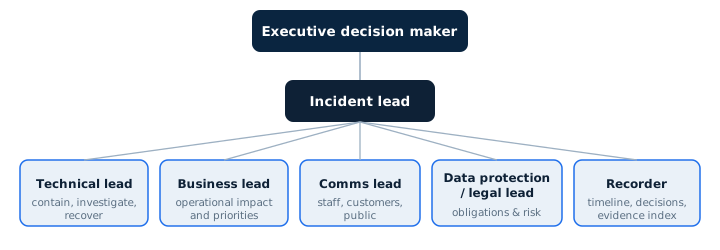
The functions, in plain terms. The incident lead owns coordination and keeps everyone pointing the same way. The technical lead runs containment, investigation and recovery. The business lead knows what the outage actually costs and what must come back first. The communications lead controls what is said to staff, customers and anyone outside. The data protection and legal lead assesses regulatory and contractual duties. The recorder keeps the single timeline of decisions, actions and evidence, which is the most undervalued job in the room and the one most likely to be forgotten. The executive decision maker provides authority for anything with significant cost, risk or business impact.
Around this core sit the external parties you may lean on: your managed IT provider, your cyber insurer and broker, a solicitor, an incident-response or forensic specialist, your cloud and software suppliers, and occasionally a communications adviser. Agree who calls whom before the day.
A simple RACI you can copy
RACI just means, for each task, who is Responsible (does it), Accountable (owns the outcome), Consulted and Informed. Here is a starting point for a small company. Adapt it to your names.
| Task | Responsible | Accountable | Consulted | Informed |
|---|---|---|---|---|
| Declare an incident | Whoever spots it | Incident lead | Technical lead | Executive |
| Contain affected systems | Technical lead / IT provider | Incident lead | Business lead | Executive, staff |
| Disconnect internet / disable accounts | Technical lead | Executive | Business lead | All staff |
| Assess data protection impact | Data protection lead | Executive | Solicitor / insurer | Incident lead |
| Communicate with customers | Comms lead | Executive | Legal, insurer | All staff |
| Approve recovery / reconnection | Technical lead | Incident lead | IR specialist | Executive |
| Keep the incident record | Recorder | Incident lead | All | All |
Severity and escalation: how bad is it?
Not every incident deserves the same response, and one of the fastest ways to waste a morning is to treat a blocked phishing email like a company-wide emergency, or a genuine ransomware outbreak like a routine ticket. A severity scale gives everyone a shared language and triggers the right level of response. We use four levels, matching the way we grade everything else: Critical, High, Normal and Low.
Crucially, severity is not about how technically interesting the attack is. It is about impact and risk. Weigh up business availability, confidentiality and integrity of data, how many users and devices are affected, whether privileged accounts or critical systems are involved, whether data theft is known or suspected, financial and regulatory implications, customer and safety impact, whether the attacker is still active, and how far the incident has spread. Any of these can push an incident up a level. A single laptop sounds minor, until you learn it was unencrypted, signed in, and held the customer database.
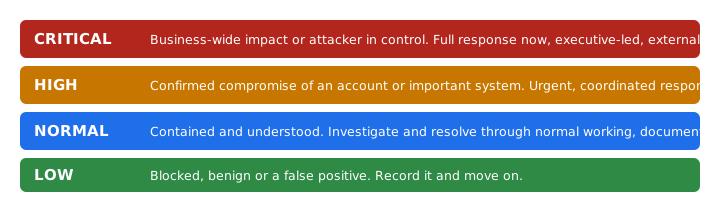
| Level | Looks like | Concrete examples |
|---|---|---|
| Critical | The business is materially disrupted, or the attacker holds the keys. | Active ransomware across multiple systems; confirmed takeover of a privileged or admin account; confirmed large-scale data theft; major payment fraud in progress; a compromise of your identity platform; an attacker still demonstrably active. |
| High | A real compromise, contained to a part of the business but serious. | A confirmed single Microsoft 365 account compromise; malware on an important server or endpoint; suspected data exfiltration that needs urgent investigation; a supplier breach that gave meaningful access; targeted phishing where credentials were used. |
| Normal | Understood and contained, being worked through. | A single endpoint infection already isolated; a suspicious login that needs checking; a lost device protected by encryption and remote wipe. |
| Low | No real harm, worth recording. | A phishing email that was blocked or reported and not clicked; a security alert that proves to be a false positive; a benign event you log for completeness. |
Set the severity early, write it down, and be willing to change it. Incidents are routinely upgraded as you learn more, and occasionally downgraded once the panic clears. The severity you assign drives who you wake up and how fast.
The first 15 minutes
The opening quarter of an hour is about getting control without making things worse. You are not solving the incident yet. You are stopping obvious ongoing harm, preserving what you will need, and getting the right people moving. Print this section and keep it with your offline plan.
- Stop and assess. Resist the urge to “just try something”.
- Declare an incident if it looks real, and say its rough severity out loud so everyone calibrates.
- Start the incident log with the current time. From now, every action gets a timestamp.
- Notify the incident lead, or become it if nobody else can.
- Separate what you know from what you are assuming. Say “we think” when you are guessing.
- Prevent obvious ongoing damage where it is safe: isolate a device, pause payments, block a rule.
- Preserve evidence. Do not delete, wipe or “tidy up”.
- Switch to safe communications if email might be compromised.
- Record timestamps for everything, including when you first noticed and who you told.
- Decide what expertise you need in the next hour, and start calling.
Do
- Disconnect a suspect device from the network but leave it powered on
- Write down what you see, with times
- Use phone or personal-device messaging if email is in doubt
- Pause finance activity if money is involved
- Ask for help early rather than late
Do not
- Wipe or reimage a device just because it looks infected. You destroy the evidence of how they got in.
- Delete suspicious emails before the headers are preserved
- Reset every password at once without understanding what depends on those accounts
- Discuss the investigation over an account that might be compromised
- Reconnect a known-infected machine to the network
- Assume the first symptom you saw is where the attack began
The first hour
With the immediate bleeding stopped, the first hour is about establishing proper command and building a shared picture. Our sequence here mirrors the NCSC’s immediate activities guidance (updated July 2026), scaled down for a business without a security team.
- Establish command: confirm the incident lead and get the key people on a call.
- Nominate the recorder. Someone owns the timeline from here.
- Set the severity and write it down.
- Work out which services are affected and which still work.
- Identify what you know so far: indicators, the likely entry route, the earliest sign.
- Decide containment priorities. What must we stop first to limit spread?
- Check whether privileged or identity accounts are involved. If yes, treat as Critical until proven otherwise.
- Contact your IT provider or incident-response specialist if the severity warrants it.
- Contact your cyber insurer early if your policy requires it. Some policies reduce cover if you engage help before calling them.
- Begin the data protection and legal assessment in parallel, not afterwards.
- Preserve evidence as you go: export logs before they roll off, screenshot what you see.
- Set up safe, out-of-band communications.
- Agree an update rhythm, for example a short check-in every 30 to 60 minutes.
- Write the first situation report.
The first situation report (SITREP)
A SITREP is a short, factual snapshot that stops everyone asking the same questions and stops rumour filling the gaps. Keep it to one screen. Update it, do not rewrite it.
| Incident ID | A simple reference, e.g. IR-2026-014 |
| Declared at | Date and time, with timezone |
| Current severity | Critical / High / Normal / Low |
| Incident lead / Technical lead | Names |
| Known impact | What is actually affected right now |
| Potential impact | What could be affected if it spreads |
| Systems / users affected | Counts and names where known |
| Data involved | Any personal or sensitive data in scope |
| Containment done / planned | What we have stopped, what is next |
| Key unknowns | The questions we cannot yet answer |
| Decisions required | What needs a yes from whom |
| External parties engaged | Insurer, IR firm, provider |
| Next update | Time of the next SITREP |
Hours 1 to 4
This is where you move from “something is wrong” to “here is the shape of it”. The work is scoping and containment in parallel: understanding how far the incident reaches while stopping it reaching further. If identity is involved, this phase is dominated by hunting through authentication records.
Depending on the incident, you will be looking at recent sign-ins and their locations, multi-factor authentication (MFA) events and any changes to how accounts sign in, mailbox rules and forwarding, delegated permissions, OAuth application consents (third-party apps a user has granted access to), active cloud sessions and tokens, affected devices and accounts, exposed credentials, signs of lateral movement (the attacker hopping from one system to the next), indicators of data being copied out, the integrity of your backups, and what your recovery depends on.
The first 24 hours
By now the shape is clearer and the work broadens beyond the technical. Over the first day you will be running investigation, evidence preservation, legal and regulatory analysis, insurer requirements, an honest look at customer and service impact, the start of recovery, internal and external communications, supplier involvement, and, easily forgotten, the welfare of the people caught up in it. Log every significant decision and why you made it. Keep financial controls tight and verify any payment or bank-detail change independently. Begin rotating credentials and secrets for anything that may be exposed, and start deciding which systems you can actually trust.
Questions your management should be able to answer
If a director cannot answer these at the end of day one, the response is not yet under control. They are also the questions a board, an insurer or a regulator will ask.
- What do we know for certain?
- What do we not yet know?
- Is the attacker still active?
- Which business processes are unavailable, and what is our minimum viable operation?
- Is personal or confidential data involved?
- Has anything left the organisation, and what is the evidence either way?
- Who must we inform, and by when?
- When is our next decision point?
- What would make this materially worse, and what must we avoid doing too early?
The first 72 hours
The famous “72 hours” comes from data protection law, and it is widely misunderstood. It is not a universal deadline to “report every cyber attack to someone”. It is the maximum time, under UK GDPR, to notify the ICO of a personal data breach that is likely to result in a risk to people’s rights and freedoms, and only where such a breach has actually occurred. Many incidents never trigger it. We deal with the detail in the next section. First, the practical shape of the three days.
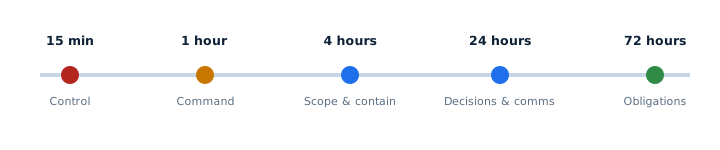
Across the three days, aim to do these eight things properly rather than any of them fast and wrong:
- Stabilise. Stop the spread and steady the business on its minimum viable operation.
- Understand. Establish how the attacker got in, what they touched, and whether they are still there.
- Contain. Keep tightening until you are confident the attacker has no path back.
- Communicate. Keep staff, and where appropriate customers, informed with facts, not speculation.
- Recover safely. Begin restoring from known-good sources in a controlled way (see section 16).
- Meet reporting obligations. Assess and, where required, notify the ICO, and consider other duties.
- Preserve evidence. Keep the log and the artefacts intact throughout.
- Keep a complete decision record. Including, importantly, decisions not to do something and why.
Reporting a cyber incident: who, and why
There is no single place to “report a cyber attack”, and reporting to one body does not satisfy your duty to another. Reporting to the NCSC, for example, does not discharge any obligation you have to the ICO. Different channels serve different purposes, so work out which apply to your incident.
| Who | When | Why |
|---|---|---|
| NCSC (ncsc.gov.uk/report) | Any significant cyber attack on your organisation | National awareness and, for serious incidents, guidance and support. Not a regulator. |
| ICO | A notifiable personal data breach, within 72 hours of becoming aware | Legal duty under UK GDPR where there is a risk to individuals. |
| Report Fraud (the police service that replaced Action Fraud in December 2025; Police Scotland via 101) | Where fraud or a cybercrime offence is involved | Reports the crime to policing and the National Crime Agency. |
| Your bank / payment provider | Immediately, if money or payment data is involved | To stop or recall payments and protect accounts. |
| Your cyber insurer | As your policy requires, often very early | To keep cover valid and access their incident panel. |
| Sector regulator / partners | Where you have specific duties | Financial services, health, legal and others have their own rules, as do many contracts. |
| Affected customers or individuals | Where a breach is high risk to them | A UK GDPR duty, and often the right thing to do regardless. |
A simple way to reason through it: Is a crime involved? Report to Report Fraud. Is personal data involved and is there a risk to people? Assess for the ICO. Is it a significant attack? Tell the NCSC. Is money involved? Call the bank. Do policy or contracts require it? Notify the insurer and any partners. The GOV.UK Signpost cyber incident service is a useful official tool for working out where to report.
Preserving evidence without pretending to be a forensics lab
Evidence matters for more reasons than a possible court case. It is how you understand what the attacker did, how you recover with confidence, how you satisfy an insurer, how you answer a regulator, and how you learn the real lesson afterwards. Destroy it early and you are guessing for the rest of the incident.
The good news is that useful evidence preservation is mostly discipline, not deep technical skill. Capture and keep, in a safe place, the things that tell the story: a timestamped incident log, screenshots of what you saw, the full headers of suspicious emails and the messages themselves, authentication and sign-in logs, firewall logs, endpoint alerts, the names of affected files, any ransom note, indicators of compromise (such as suspicious IP addresses or file names), changes made to accounts, and any administrator or configuration changes, whether the attacker’s or your own.
A light-touch chain of custody
Chain of custody sounds like a courtroom drama, but for an SME it just means being able to say, for each piece of evidence, where it came from and who has touched it. Keep it simple:
- Work from a copy, keep the original untouched
- Note who collected it, when, and from where
- Where it matters, record a hash or checksum (a digital fingerprint that proves a file has not changed)
- Note where it is stored and who has accessed it
Two cautions. Do not go beyond your competence: non-specialists should not start imaging drives or poking at live compromised systems, because it is easy to overwrite the very evidence you are trying to keep. And know when to bring in professional digital forensics, which is any time the incident is serious, likely to involve a claim or dispute, or where you genuinely need to prove what did and did not happen.
Communicating during an incident
Poor communication turns a manageable incident into a reputational one. The principle throughout is the same: say what you know, say it to the right people, and do not speculate.
Internal
Staff usually want to help and, without direction, will improvise in ways that hurt. Tell them plainly what to stop doing, which services not to use, whether remote access is allowed, whether they need to change passwords, how to report anything odd, and where updates will come from. A short, calm message beats silence, which rumour will fill.
Executive
Give leaders the SITREP, not a running commentary. Facts, current severity, decisions needed. Speculation at board level tends to become instruction.
Customers
Be timely, accurate and transparent, and careful not to over-promise or guess at cause or scale before you know it. A brief holding statement that says you are aware, taking it seriously and will update, is almost always better than a detailed one you have to retract.
Press and social media
Only named, designated people speak publicly. Everyone else, however well-meaning, points enquiries to them.
Communicating with the attacker
If ransomware or extortion is involved and there is any question of contact with the attacker, that is not a decision to take on instinct. It carries legal, insurance and law-enforcement considerations, and should involve specialists. There is no simple “always talk” or “never talk” rule.
Safe communications
All of this assumes you can talk to each other. If Microsoft 365 or your email is compromised, you need an alternative that the attacker cannot see: a messaging app on personal devices, a separate email domain, or phones. The time to set this up is before the incident, because during one you cannot trust the channel you would normally use to arrange it.
Want someone to review your incident-response readiness?
Most of the pain in a real incident comes from decisions and gaps you could have sorted in advance. We can review where you stand across identity, logging, backups, roles and reporting, and give you a plain, prioritised list.
Book a free IT and security reviewSix practical playbooks
These are condensed, defensive playbooks for the incidents UK SMEs face most. They tell you what to look at and what to put right, not how to attack anyone. Each assumes you have already done the first-15-minutes basics above.
Playbook 1: phishing and business email compromise (Microsoft 365)
Scenario: a member of staff entered their password into a convincing fake login page, and an attacker has signed into their Microsoft 365 account. This is the most common serious incident we see. The danger is not just the mailbox, it is what the attacker does from inside it: reading finance emails, changing bank details on invoices, and phishing your customers and colleagues from a trusted address.
Investigate: recent sign-ins and their locations; MFA prompts and any newly registered authentication methods; changes to how the account signs in; new mailbox rules (attackers create rules that auto-delete or hide their replies); forwarding to external addresses; delegated mailbox permissions; sent and deleted items; consented OAuth applications; any administrative changes; which SharePoint and OneDrive files were opened; any emails about payments or bank details; and whether internal phishing was sent from the account.
Recover: contain the account (block sign-in); reset the password and re-secure MFA; revoke active sessions and tokens so existing logins are killed, not just future ones; remove malicious rules, forwarding, delegations and app consents; check whether other accounts were hit the same way; investigate any payment fraud that resulted; and monitor closely for a return. Refreshing the password alone is not enough, because a live session or token can keep the attacker in.
Playbook 2: ransomware
Scenario: files across a shared drive are encrypted and a ransom note has appeared. The instinct to pull every plug is understandable, but blunt. The aim is to stop the spread and protect what is still clean, not to cause a second outage.
Act on: isolate affected systems rather than shutting everything down indiscriminately; stop the spread by segmenting the network; identify which segments are affected and protect the ones that are not; above all protect your backup infrastructure, which ransomware operators target deliberately; check whether identity has been compromised; assess impact on hypervisors and servers; review internet and VPN exposure; look for signs of data theft, because modern ransomware usually steals data before encrypting it; and preserve the ransom note and any attacker communications.
Then: set recovery priorities; bring in external incident-response support for anything beyond a single machine; involve your insurer and, where a crime or serious data theft is in play, consider law-enforcement and NCSC reporting; manage communications carefully; and restore only from known-good data.
The NCSC’s ransomware guidance is the authoritative UK reference here.
Playbook 3: data loss or data exfiltration
Scenario: you suspect data has been copied out of the business. The central task is to pin down exactly what information may be involved: whose data it is, how sensitive, roughly how many records or people, and whether it was protected (encrypted). Then establish the crucial difference between data that was merely accessible and data that was demonstrably accessed or taken, because the evidence for each is different and the consequences differ. Contain the exposure, run the data-protection assessment, check contractual notification duties, and consider whether affected individuals need to be told. A simple risk table (what data, how sensitive, how many people, likely harm) turns a vague worry into a decision you can defend.
Playbook 4: lost or stolen device
Scenario: a laptop or phone has gone missing. The severity depends almost entirely on two facts: what was on it, and whether it was protected. Establish who reported it and when, which device it is, what data it held, whether it was encrypted, and whether it is enrolled in mobile device management (MDM) so you can lock or wipe it remotely. Consider active sessions, saved tokens and credentials, and whether the user had local administrator rights. Report it as appropriate and run a short risk assessment. This is why “laptop stolen” and “unencrypted laptop holding the customer database, stolen while still signed in” are entirely different incidents, even though the police report reads the same.
Playbook 5: supplier or third-party compromise
Scenario: a supplier or software provider tells you they have been breached. Your first job is to map the exposure: how are you integrated with them, what credentials or API keys connect you, do they have remote access or a VPN into your environment, are there shared accounts, do they hold delegated access to your Microsoft 365, and what data do you share. Then act: revoke or rotate any access they hold, look for evidence of misuse on your side, understand any onward supply-chain impact to your own customers, and check your contractual obligations. Supplier incidents are easy to treat as someone else’s problem right up to the point where their access becomes your breach.
Playbook 6: website or public service compromise
Scenario: your website has been defaced, is redirecting visitors, or is serving malicious code. Look for the mechanism: injected code, a malicious redirect, credential theft from a form, a compromised CMS admin account, a hosting-account compromise, unexpected DNS changes, or worst of all a domain registrar takeover. Consider whether any customer data is implicated. Recover by cleaning to a known-good state, patching the root cause rather than just removing the symptom, and rotating every relevant secret including CMS, hosting, database and API credentials. A defaced page that you simply overwrite, without fixing how they got in, tends to come straight back.
Recovery: do not rush back online
The pressure to “just get everything working” peaks exactly when giving in to it is most dangerous. Reconnect too early, on top of an attacker you have not fully evicted, and you hand them a second attempt with your defences down. Recovery is deliberate and staged.
Start with minimum viable operations
Decide what absolutely has to work first. It differs by business, but a common order is identity, then communications, then network, then your core business system, then finance, then customer-facing services, then file and data services, then everything else. The point is to choose the order in advance so you are not debating it while customers wait.

Recovery itself is a mix of clean rebuilds and careful restores: rebuild from a known-good baseline where you can, patch the vulnerability that was used, rotate credentials and secrets and API keys, re-establish MFA and conditional access, confirm endpoint security is running, turn monitoring back up, validate your backups before trusting them, restore data, and reconnect systems in controlled stages under heightened watch rather than all at once.
The recovery gate checklist
Before any system goes back on the network, it should pass every one of these. If you cannot answer yes, it is not ready.
- Is the root cause understood well enough to stop a repeat?
- Is the vulnerability or control gap actually remediated?
- Have compromised credentials been invalidated?
- Has any attacker persistence been removed?
- Is the source we are restoring from clean?
- Is the logging we will need switched on?
- Is endpoint protection operational on it?
- Has the restored data been checked?
- Can we detect it if the problem recurs?
- Is a rollback possible if this goes wrong?
- Who has approved reconnection?
The post-incident review
Once the fire is out, there is a strong urge to never speak of it again. Resist it. The review is where an incident stops being pure cost and becomes the thing that makes the next one smaller. Done well, it is not about finding someone to blame. It is about finding the conditions that allowed the incident to succeed, because those conditions, not the individuals, are what you can actually change.
Make it psychologically safe. People who fear blame hide the details you most need, and the honest account of “I clicked the link and didn’t say anything for a day” is worth more than any tool. Work through questions like these:
What happened
- What actually happened, and when did it really begin?
- When did we detect it, and what slowed detection?
- What allowed it to happen?
- What limited the damage?
How we did
- What worked well, and what failed?
- Which assumptions turned out wrong?
- Which logs were missing, which permissions too broad?
- Which suppliers were hard to reach, which decisions lacked a clear owner?
Then turn the findings into a short list of actions, each with an owner, a priority, a due date and a way to tell it is done. Split them into what changes immediately and what belongs on the longer roadmap. An action without an owner and a date is a wish, not an improvement.
Testing the plan before you need it
A plan that has never been rehearsed is a set of assumptions. The first time you discover that the emergency admin account’s password is in a vault that also needs that account to open is during the incident, unless you tested it first. There are three levels, and you do not need to do them all at once.
Tabletop exercises gather the responders and management around a table and talk through a scenario: what would we do, who would we call, what would we say. They are cheap, low-risk and surprisingly revealing. Technical exercises actually test the mechanics: can you isolate a machine, disable an account, restore a backup, reach emergency admin access, use your alternative communications. Recovery exercises prove you can restore core services and data to a working state, not just that the backup job reports success.
Rehearse at a frequency that matches your risk rather than to a made-up legal interval. For most SMEs, a tabletop once or twice a year plus an annual backup-restore test is a sensible floor. The NCSC’s free Exercise in a Box is a good, no-cost place to start, and the four scenarios in our toolkit are written to be run in an hour.
The free Cyber Incident Response Toolkit
Everything above becomes far more useful as documents your team can fill in and print. We have packaged this guide into a free, ungated toolkit for UK SMEs: an editable incident response plan template, a printable first-72-hours checklist, an incident log, a severity matrix, an emergency contact sheet, an evidence register, a personal data breach assessment, a communications pack, a playbook pack, a post-incident review template and four tabletop exercises, plus a plain-English README. The aim is simple: a company could download it on Friday and start building its own incident-response capability on Monday.
Download the free Cyber Incident Response Toolkit
Eleven editable templates and checklists, no email address required. Templates in Word and Excel, checklists and playbooks as print-ready PDFs, all in one download.
Get the toolkitFrequently asked questions
It is a documented, agreed set of steps for how your business detects, contains, investigates, recovers from and learns from a cyber incident. A good plan names who does what, how you decide severity, who can authorise big decisions, how you communicate when normal systems are down, and who you may need to report to. Its value is that these decisions are made calmly in advance, not invented under pressure.
Yes, and the smaller you are the more a plan helps, because you have less slack to absorb chaos. You do not need an enterprise document. A few pages covering critical systems, roles, contacts, severity and reporting is enough to change the outcome. Only around a quarter of UK businesses have a formal plan, which is exactly why having one is such an advantage.
Stop and assess rather than react. Start writing down what you see, with times. Isolate anything that looks compromised by disconnecting it from the network, but do not wipe it. Switch to communications the attacker cannot see if email might be affected. Pause any payments if money is involved. Nominate one person to lead and get the right help on the phone. Hold off on public statements until you understand what happened.
It depends, and blunt shutdowns can do harm. Isolating affected machines from the network to stop the spread is usually right. Powering everything down indiscriminately can destroy useful evidence held in memory and complicate recovery. The priority is to stop the spread and protect clean systems and your backups. For anything beyond a single machine, get experienced help before making sweeping changes.
Block the account and reset its password, but also revoke active sessions and tokens, because a password reset alone can leave a live session open. Then hunt for what the attacker set up: mailbox rules, forwarding, delegated permissions, consented apps and any new sign-in methods. Check for payment or invoice fraud and for phishing sent from the account, and review whether other accounts were hit the same way.
When the incident actually affects personal data, meaning it leads to the loss, unauthorised access, alteration or disclosure of information about identifiable people. A phishing email that was blocked is an incident but not a breach. The same attacker reading and forwarding emails full of customers’ details is a personal data breach, which is the type that can carry a duty to report.
No. Under UK GDPR you must report a personal data breach to the ICO only where it is likely to result in a risk to people’s rights and freedoms. Many minor breaches do not meet that threshold. You should still record every breach and your reasoning, including why you decided not to report one. If the risk to individuals is high, you also have to tell the affected people. Always check the current ICO guidance, as this is guidance not legal advice.
It starts when you become aware that a notifiable personal data breach has probably occurred, not when the attack began or when you have the full picture. You then have up to 72 hours to notify the ICO where feasible. You are not expected to know everything by then; the approach is to report what you know and update later. If you take longer than 72 hours, you must explain why.
Check your policy now, before you ever need it. Many cyber policies require you to notify their incident line early and to use their approved responders, and engaging your own help first can reduce or invalidate cover. Others are more flexible. Knowing your policy’s requirements in advance means you are not reading the small print at 8am during a crisis.
This is a serious decision with legal, financial and ethical dimensions, and it is not one to take alone or in a hurry. Paying does not guarantee you get working data back, may not stop stolen data being leaked, funds further crime, and can carry legal risk depending on who the attacker is. UK authorities and the NCSC discourage payment. Involve your insurer, a solicitor and specialist advisers, and consider law-enforcement input before any decision.
Match it to your risk rather than a fixed rule. For most SMEs a tabletop exercise once or twice a year, plus an annual test that you can actually restore critical data from backup, is a reasonable minimum. Test again after any significant change to your systems, and after a real incident.
Think in functions, not job titles: an incident lead to coordinate, a technical lead for containment and recovery, a business lead who understands operational impact, a communications lead, a data protection or legal lead, a recorder to keep the timeline, and an executive who can authorise big decisions. In a small business one person may cover several, and the technical and legal roles are often filled by your IT provider, insurer or solicitor.
When you can pass the recovery gate: root cause understood, vulnerability fixed, compromised credentials invalidated, attacker persistence removed, the restore source confirmed clean, logging and endpoint protection in place, and a way to detect a recurrence. A backup that predates the visible damage is not automatically clean, because attackers often lurk for weeks first, so validate before you trust it.
Further authoritative guidance
This guide interprets official UK sources for a smaller business. For the primary material, go to:
- NCSC, What to do when cyber attacks disrupt your organisation and the Small Business Guide: Response and Recovery
- NCSC, Ransomware guidance and Exercise in a Box
- ICO, Personal data breaches: a guide
- GOV.UK, Where to report a cyber incident, and the Cyber Security Breaches Survey 2025/2026
Learn it as a team
Join a free System Force cyber-security webinar and walk your team through incident response with worked scenarios.
See upcoming webinarsStay a step ahead
Get our weekly IT and cyber-security briefing: plain-English updates for UK businesses, no jargon.
Get the weekly briefingRelated guides in this series
This guide is the hub of a practical incident-response series. Go deeper on any part:
- What to do after a Microsoft 365 account is compromised
- Ransomware response checklist for UK SMEs
- Data breach vs cyber incident: what is the difference?
- How to run a cyber incident tabletop exercise
- What logs do you need for a cyber investigation?
- How to test your disaster recovery plan
- What to tell customers after a cyber incident
- Cyber insurance and incident response: before you claim
- How to preserve evidence after a cyber attack
- How long does ransomware recovery actually take?
- Keep the business trading during any disruption: the free Business Continuity Toolkit
Stay one step ahead of the threats
Get our free weekly IT and cyber security briefing for UK businesses. The same threat and policy round-up we send our own clients, straight to your inbox. No spam, unsubscribe any time.
Get the free weekly briefing →

