
“We back up every night, so we are covered.” It is the most common thing we hear when we ask a business about recovery, and it quietly answers the wrong question. A nightly backup tells you something about how much data you might lose. It tells you almost nothing about how long you would be down, whether the backup would actually restore, or which systems should come back first. Getting recovery right means separating those questions, and that starts with two objectives that are constantly confused: RTO and RPO.
This guide explains RTO vs RPO in plain English, shows how to set targets you can actually meet, and works through the everyday failures, an email outage, a lost database, a dead internet line, a supplier going down, where the two objectives behave very differently. It builds on the method in our Business Impact Analysis guide and the wider Business Continuity Plan guide. There is a free Recovery Objectives workbook to record your own targets as you read.
The two questions RTO and RPO answer
Every recovery objective is really a promise about time, and there are two different times that matter when something breaks. One looks forward from the moment of disruption: how long until we are working again? The other looks backward: how much of our recent work will we have lost? RTO and RPO are just names for those two promises.
- Recovery Time Objective (RTO) is the target time to get an activity back to an acceptable level after a disruption. It measures forward from the incident. An RTO of four hours means you intend to be operating again within four hours.
- Recovery Point Objective (RPO) is the maximum amount of data, measured as a span of time, you can afford to lose. It measures backward from the incident to your last recoverable point. An RPO of one hour means you must never be more than an hour behind, so anything less frequent than hourly protection is not enough.
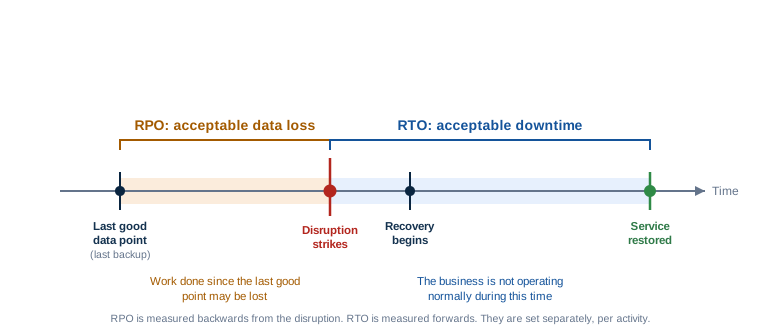
The single most useful thing to remember: RPO is about data, RTO is about time, and they are set independently. A system can have a tight RPO and a loose RTO, or the reverse. Your accounts ledger might tolerate a day of downtime but almost no data loss; your public website might tolerate losing a day of minor edits but not being down for an afternoon.
RTO vs RPO at a glance
| RTO (Recovery Time Objective) | RPO (Recovery Point Objective) | |
|---|---|---|
| Question it answers | How long can this be down? | How much recent data can we lose? |
| Measured | Forwards from the disruption | Backwards from the disruption |
| Units | Time to restore (minutes, hours, days) | Time between recovery points (minutes, hours, days) |
| Mainly driven by | Recovery process, tooling, people, dependencies | Backup and replication frequency |
| You improve it by | Faster, tested recovery; standby capacity; rehearsals | More frequent backups or continuous replication |
| Fails silently when | Recovery has never actually been tested end to end | Backups run but are never test-restored |
Quoting one when you mean the other is a classic and expensive mistake. “Our RTO is last night’s backup” is not an RTO at all; it is a confused RPO. Keep the two words attached to their questions and the confusion disappears.
Why conflating them causes real damage
When the two are treated as one number, investment goes to the wrong place. A business worried about downtime buys more frequent backups, which does nothing to speed up recovery. A business worried about data loss builds a fast failover for a system whose real risk is losing a day of transactions. Splitting the objective in two forces the honest question for each system: is our exposure mainly time or mainly data, and usually the answer is different for different systems.
Backup frequency alone does not prove your RPO
This is where false comfort lives. A nightly backup implies an RPO of up to 24 hours, but only if the backup actually works. Backups fail quietly all the time: a changed folder path, a full disk, an expired credential, a job that has been erroring for weeks with nobody reading the email. A backup you have never restored from is a hypothesis, not a recovery point. Your real RPO is defined by your last successful, verified recovery point, not by how often the job is scheduled. The only way to know your RPO is to periodically restore and check the data, which is exactly what our Backup & Disaster Recovery Checklist is built to enforce.
An RTO is not credible until it has been tested
An RTO written in a document is an aspiration. An RTO you have proven by actually restoring the system and timing it is a plan. The gap between the two is usually enormous, because real recovery involves steps that never appear in the estimate: finding the right backup, provisioning somewhere to restore it to, waiting on downloads, reinstalling software, reconnecting integrations, re-pointing DNS, and testing that the thing actually works before you trust it. A “four-hour RTO” that has only ever existed on paper is not four hours. The first time anyone should discover how long recovery really takes is a rehearsal, not a real incident. Our guide to building and exercising a continuity plan covers how to run those tests without disrupting live systems.
The business sets the objectives; technology delivers them
RTO and RPO are business decisions dressed in technical clothing. The right target for a system comes from what the business can tolerate, not from what the current backup happens to provide. That is why recovery objectives flow directly out of the business impact analysis: the BIA tells you how quickly each activity’s impact becomes serious, and that tolerance becomes the RTO; it tells you how much recent information the activity cannot function without, and that becomes the RPO. Set the objective from the business need first, then design the technology to meet it, never the other way around. Working backwards from your existing kit just bakes today’s limitations into tomorrow’s plan.
Not every system needs the same target
Trying to give everything a one-hour RTO and a near-zero RPO is the fastest way to spend a fortune and still not be resilient, because effort is spread evenly instead of where it matters. The BIA gives you a priority order; recovery objectives turn that order into tiers. A workable pattern, which you should adapt, looks like this:
| Tier | Example systems | Typical RTO | Typical RPO |
|---|---|---|---|
| Tier 1 — critical | Order taking, payments, core line-of-business app | Minutes to a few hours | Minutes to an hour |
| Tier 2 — important | Email, shared files, finance system | Same business day | A few hours |
| Tier 3 — standard | Internal wikis, reporting, archives | 1 to 3 days | 24 hours |
The figures are illustrative. The discipline is the point: decide the tier from business impact, and let the tier drive the spend. Tight targets cost real money, so reserve them for the activities that genuinely need them.
Aim for minimum viable operations first, not full service
An RTO does not have to mean “everything back to normal”. It usually means “back to a safe, workable level”. That level is your minimum viable operation: the smallest version of an activity that lets you keep meeting your most important obligations while full recovery continues in the background. Setting the RTO against minimum viable operations rather than full restoration makes it both more honest and more achievable. You might restore the ability to take and record orders within two hours (minimum viable), while the reporting, analytics and integrations that sit on top take another day. Splitting the target this way stops teams freezing in pursuit of a perfect, all-at-once recovery that was never realistic.
Perfect backups do not help if a dependency is down
Here is the trap that catches technically well-run businesses: your recovery objectives assume you control the whole recovery, and often you do not. A recovery can be blocked by something entirely outside your systems.
Connectivity
If your line-of-business app is in the cloud and your internet connection is down, your flawless backups are irrelevant, because you cannot reach the service to use it. The RTO is now governed by your provider’s repair time, not your restore time.
Suppliers and platforms
When the outage is your SaaS vendor’s, your identity provider’s or your payment processor’s, you cannot “restore” your way out. Your effective RTO is theirs, and you plan around it with workarounds, not backups.
Communications
If email and telephony are the thing that is down, recovery coordination itself is impaired. A dependency on the failed system to manage its own recovery is a classic single point of failure.
People and access
The fastest restore in the world stalls if the one person who knows the process is unreachable, or the credentials to start the recovery are locked inside the system that is offline.
The lesson is not to distrust backups; it is to set recovery objectives with the whole dependency chain in view. Map dependencies during the BIA, and for the ones you do not control, plan a workaround rather than a restore. This is exactly why business continuity is broader than IT disaster recovery.
Worked examples: the same two objectives, six very different failures
Recovery objectives only click into place with concrete cases. Here is how RTO and RPO play out across the failures a UK SME actually experiences.
1. Microsoft 365 email outage
If Microsoft 365 itself has an outage, this is a dependency problem, not a restore problem. Your RTO is governed by Microsoft’s recovery, so the plan is an alternative way to communicate (a secondary channel, key contacts held offline) rather than a backup. If instead the problem is data loss, mailboxes deleted, a compromised account, ransomware in a synced folder, then RPO matters, and it exposes a common gap: Microsoft protects the platform, but retaining and recovering your mail and files to a chosen point is your responsibility, which is why third-party Microsoft 365 backup exists.
2. A lost or corrupted database
This is the purest RPO case. If your core database is corrupted at 3pm and your last verified recovery point was midnight, you have lost the day’s transactions regardless of how quickly you restore. Here, RPO is the expensive dimension: moving from nightly to hourly protection, or to continuous replication, is what shrinks the loss. The RTO still matters, but the data-loss window is what the business will feel.
3. A failed internet connection
Backups are irrelevant here; nothing is lost and nothing needs restoring. The objective is an RTO met by a failover path: a second line, a 4G or 5G backup, or the ability for staff to work from another location. The realistic RTO is set by how quickly that alternative connectivity takes over, not by any recovery process.
4. A line-of-business application failure
Your key operational system goes down. Both objectives apply and often conflict: the business wants a tight RTO (you cannot trade without it) and a tight RPO (you cannot lose recent records). This is usually a Tier 1 system where minimum viable operations matter most, get to a state where you can keep serving customers, even in a reduced way, then restore full function. It is also the system most worth rehearsing, because its recovery has the most moving parts.
5. Loss of premises
Fire, flood or a cordon makes the building unavailable. No data is necessarily lost, so RPO may be irrelevant, but the RTO for every activity that depends on the premises is now in play at once. Recovery objectives here are met by location independence: cloud access, remote working readiness, and knowing which activities simply cannot run without physical premises so you can plan around them.
6. A critical supplier failure
A supplier you depend on, a SaaS platform, a payment provider, a logistics partner, suffers its own disruption. You cannot restore their service. Your effective RTO is set by their recovery, and your only levers are a documented workaround, a fallback supplier, or degraded operation until they return. This is the case that pure IT disaster recovery cannot address, and where continuity planning earns its keep.
Setting realistic recovery objectives, step by step
- Start from the BIA. Take your prioritised activities and their tolerable disruption windows. The objectives come from the business need, not the current backup.
- Set RTO and RPO separately for each activity. Ask the two questions independently: how long can this be down, and how much recent data can it lose?
- Define the minimum viable operation. Set the RTO against a workable reduced level, with full restoration as a later step.
- Check the dependencies. For anything you do not control, replace “restore” with “workaround” and set the objective accordingly.
- Test both. Restore from backup to verify the RPO is real; time a full recovery to verify the RTO is achievable. Adjust the target or the investment until they match reality.
- Record and review. Capture the agreed objectives, who owns them, and revisit them whenever the business changes. Our Recovery Objectives workbook gives you a structured place to do this.
Free Recovery Objectives Workbook
Record an RTO and RPO for every critical activity, tier them, and note the dependencies and workarounds, in one structured spreadsheet. Part of the free Business Continuity & BIA Toolkit. No macros, no sign-up.
Put a figure on the downtime
Tight recovery targets cost money. See what an hour, or a day, of downtime is actually worth to your business with the free Downtime Cost Calculator, and size your objectives accordingly.
Frequently asked questions
RTO (Recovery Time Objective) is how long an activity can be down before it must be restored, measured forwards from the disruption. RPO (Recovery Point Objective) is how much recent data you can afford to lose, measured backwards to your last recoverable point. RTO is about time; RPO is about data. They are set separately for each activity.
Only if the backup actually works. Your real RPO is defined by your last successful, verified recovery point, not by how often the job is scheduled. Backups fail quietly, so the only way to know your true RPO is to restore periodically and check the data.
Start from your business impact analysis to find how quickly the activity’s impact becomes serious, set the target against a minimum viable operation rather than full restoration, account for dependencies you do not control, and then test it by timing an actual recovery. An RTO that has never been rehearsed is an aspiration, not a plan.
Neither in general; it depends on the activity. A transactional database usually needs a tight RPO because losing recent data is costly. A public website might tolerate some data loss but not a long outage, so RTO dominates. That is why you set them independently for each system.
Not by restoring, because you do not control their systems. When a supplier, internet line or platform is the thing that is down, your effective RTO is set by their recovery time. You plan for this with workarounds, alternative connectivity or fallback suppliers, not with backups.
No. RTO and RPO are standard business continuity concepts used in ISO 22301, but using them does not make an organisation certified. ISO 22301 certification is a separate, audited process. Note that System Force IT holds UKAS ISO/IEC 27001 certification for information security, which is a different standard from ISO 22301.
Related reading: the Business Impact Analysis guide (where recovery objectives come from), the full Business Continuity Plan guide, the free Business Continuity & BIA Toolkit, the Backup & Disaster Recovery Checklist, and the Business Continuity Readiness Check.
Check your readiness
A free 5-minute check of how ready your business is to keep going through a disruption.
Want help setting yours?
We can set and test realistic RTOs and RPOs for your critical systems, and build the plan to meet them.
Stay one step ahead of the threats
Get our free weekly IT and cyber security briefing for UK businesses. The same threat and policy round-up we send our own clients, straight to your inbox. No spam, unsubscribe any time.
Get the free weekly briefing →

