
It is 07:45 on Tuesday. A burst water main means nobody can get into the building. The phone system is in the cloud and still works, but the finance team needs figures held on the office server. Two key people have laptops at home. Twenty others do not. Your biggest customer expects today’s orders by midday. Somebody asks the obvious question: “What exactly do we need running first?”
Notice what that question is not. It is not “how do we get the building back”, and it is not “how do we restore the server”. It is “what matters most, and how do we keep it going”. That is business continuity, and it is a different discipline from IT recovery or cyber incident response, though the three are often confused.
Here is the principle this whole guide turns on. Business continuity is not about keeping everything running. It is about understanding what matters most, how long it can be unavailable, what it depends upon, what minimum level of operation is acceptable, and how the organisation will keep working until normal service returns. A business that tries to protect everything equally protects nothing well.
This guide shows you how to build a business continuity plan that actually works, for a UK business of roughly 10 to 250 people that does not have a dedicated business continuity manager. It is deliberately practical, and it leans on current UK guidance from the National Cyber Security Centre (NCSC), the National Risk Register 2026 and the internationally recognised business continuity standard ISO 22301, translated into plain English at SME scale. There is a free, editable toolkit at the end, including the Business Impact Analysis workbook that is the real engine of the whole thing.
Free Business Continuity & BIA Toolkit
Sixteen editable templates for UK SMEs: a BCP template, the BIA workbook, recovery-objectives and dependency registers, a minimum viable operations worksheet, scenario playbooks and six tabletop exercises. No sign-up.
- Business continuity in plain English
- Do the BIA before the plan
- Start with products and services
- Business Impact Analysis, properly
- RTO, RPO, MTPD and MVO
- Dependency mapping
- Risk assessment vs BIA
- The capability-loss model
- Recovery strategies
- Continuity is a business decision
- Plan activation and command
- Minimum viable operations
- Manual workarounds and vital records
- Communications during disruption
- Scenario playbooks
- Recovery priority, order and backlog
- Cloud, remote, suppliers and people
- Testing and maintaining the plan
- Two worked examples
- Frequently asked questions
Business continuity in plain English
Several disciplines get muddled here, and the confusion is expensive because each answers a different question. Get them straight and everything else is easier.
Business continuity management
The management process for understanding disruption risk, identifying priority activities, preparing alternative arrangements, responding to disruption and keeping important services running. This is the whole discipline.
Business continuity plan (BCP)
The practical plan you use when disruption actually happens. The document your team reaches for at 07:45 on that Tuesday.
Business impact analysis (BIA)
The structured analysis that works out what matters, how disruption hurts over time, which activities to recover first, and what they depend on. The foundation everything else is built on.
Disaster recovery (DR)
Primarily restoring technology, systems and data. A subset of continuity, focused on IT.
Incident response
Controlling and resolving an incident, particularly a cyber or security incident: detect, contain, investigate, remove.
Crisis management
Strategic leadership, decisions and communication during a serious disruption.
The important distinction for this guide: business continuity is much broader than IT. It covers people, premises, technology, data, communications, utilities, suppliers, logistics, finance, key knowledge, decision-making, customer commitments and regulatory obligations. Disaster recovery restores the server. Business continuity keeps the business trading while the server is down, and decides whether the server even matters that morning.
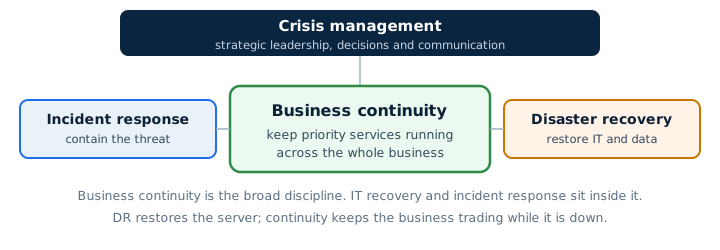
If a cyber attack is what causes your disruption, the two disciplines run side by side: your incident response plan contains and investigates the security event, while your business continuity plan keeps priority services operating. This guide is about the second job.
The most important principle: do the BIA before the plan
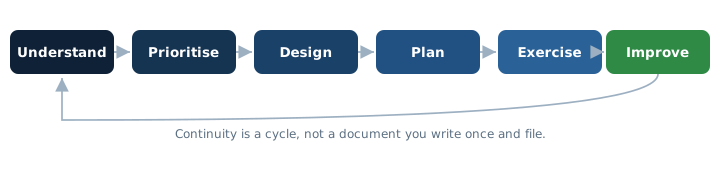
Most business continuity plans fail for one reason above all others: they were written before anyone understood the organisation’s actual priorities. A plan built on guesswork tells you to recover the wrong things in the wrong order, and it collapses the first time it meets reality. The correct sequence is not complicated, but it has to be followed in order.
- Understand your products and services.
- Identify the critical activities that deliver them.
- Understand how impact grows over time if each is unavailable.
- Identify what each activity depends on.
- Define recovery objectives (how quickly, how much data loss).
- Choose continuity and recovery strategies.
- Write practical plans.
- Exercise them.
- Improve them.
- Maintain them as the organisation changes.
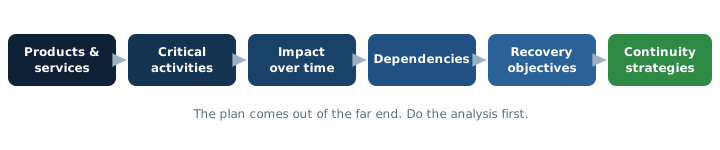
Steps one to five are the business impact analysis. Notice that writing the plan is step seven, not step one. The businesses whose plans work in a real disruption are the ones that did the thinking first.
Start with products and services, not technology
The classic mistake is to begin with the technology. IT-led continuity planning produces statements like “Server A must be recovered within four hours”, which sounds precise and is almost useless, because nobody in the business knows why four hours, or whether Server A even matters to the thing customers actually care about.
Turn it around. Start with the outcome:
Processing urgent orders might depend on people, Microsoft 365, your order or ERP system, internet connectivity, phones, finance approval, payment processing, supplier availability, the warehouse, transport, data, authentication and the premises. Some of those you can lose without stopping orders. Some you cannot. Only by starting from the business outcome do you find out which is which. This makes your continuity plan business-led rather than technology-led, and it is the difference between a plan that protects revenue and a plan that protects a server nobody would have missed.
Business Impact Analysis, properly
The business impact analysis is where continuity planning is won or lost, and it is the part most SME guides skate over. A BIA does two things: it identifies which activities genuinely matter, and it shows how the pain of losing each one grows over time. Done well, it produces a defensible recovery order that everyone in the business can understand. Done badly, it is a list of systems with no priorities attached.
Go deeper: our standalone Business Impact Analysis guide for UK SMEs works through the whole method in detail, with a fictional worked example and how to turn the findings into recovery priorities.
For each important service or activity, work through who owns it and who depends on it:
| For each activity, capture | Why it matters |
|---|---|
| Owner | Someone has to be accountable for recovering it. |
| Customers and stakeholders | Who feels it if this stops. |
| Normal operating hours and busy periods | An outage at month-end payroll is not the same as a quiet Tuesday. |
| Legal, contractual and regulatory obligations | Some commitments carry penalties or duties. |
| Safety implications | Some activities cannot be degraded safely. |
| Financial, customer, reputational and operational impact | The four ways disruption hurts. |
| Downstream dependencies | What else stops if this stops. |
Impact grows over time, so measure it over time
The single most useful idea in a BIA is that impact is not a fixed number, it is a curve. Losing your order system for ten minutes is an annoyance. Losing it for three days is a business event. So instead of asking “how bad is it”, ask “how bad is it after one hour, after four hours, after a day, after a week”. Suggested time bands, which the workbook lets you adapt:
- Under 1 hour, 1 to 4 hours, 4 to 8 hours
- 8 to 24 hours, 1 to 3 days, 3 to 7 days
- 1 to 2 weeks, more than 2 weeks
Score or describe the impact in each band across your impact categories (financial, operational, customer, legal or regulatory, reputational, safety, contractual). The point where impact tips from “manageable” to “serious” is what sets your recovery objective for that activity. These bands are a starting point, not a rule. A bakery and a law firm will care about very different timescales, and the workbook is built to be adapted.
RTO, RPO, MTPD and MVO explained properly
These four terms cause more confusion than any others in continuity planning, partly because generic articles define them badly. Here is what each actually means, in plain English.
Go deeper: see RTO vs RPO Explained for a full comparison table, a recovery timeline and six worked examples of setting realistic recovery targets.
RTO: Recovery Time Objective
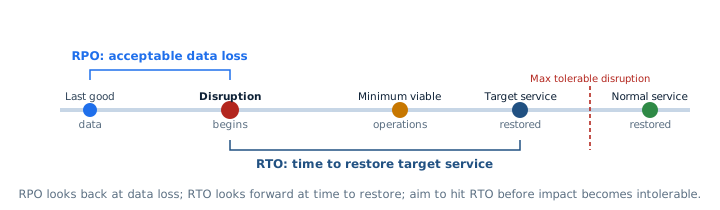
How quickly a service, process or system needs to be restored to an acceptable level. If urgent orders must be flowing again within four hours, that activity has an RTO of four hours. The crucial point people miss: an RTO is a target you set based on impact, not a promise the technology automatically keeps. You work out the RTO from the BIA (how long can we tolerate this being down), then check whether your actual recovery capability can meet it. The gap between the two is where your continuity investment goes.
RPO: Recovery Point Objective
How much data you can tolerate losing, measured backwards in time. If your RPO is four hours, then after a failure you must be able to recover to a point no more than four hours before it, so restoring last night’s backup would not be good enough. RPO is really a question about how often you protect data, and it matters most where the state of data changes constantly, such as a transactional order or finance system. For a document library that rarely changes, RPO is far less critical. RTO is about time to restore; RPO is about acceptable data loss. They are not the same thing, and quoting one when you mean the other is a common and costly error.
Maximum Tolerable Period of Disruption
This is broadly the point at which the disruption becomes unacceptable to the business, after which the damage may be irreversible. Terminology varies between frameworks, so avoid false precision. The practical use is simple: your RTO should sit comfortably before the point where impact becomes intolerable, giving you a margin rather than cutting it fine.
Minimum Viable Operations
The NCSC defines minimum viable operations (MVO) as the lowest level of operational capability at which the organisation can continue to operate safely, meet its legal and regulatory obligations, and maintain trust with customers, partners and staff. It is one of the most useful ideas in modern continuity planning, because it stops you trying to restore everything at once. During a serious disruption you do not aim for normal, you aim for MVO first, then build back up.
Dependency mapping
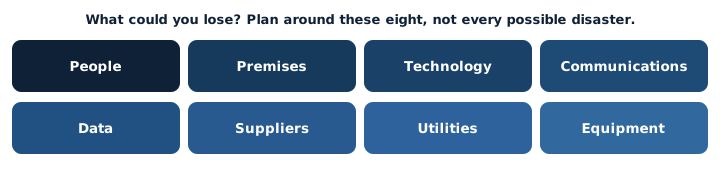
Once you know which activities matter and how quickly they must recover, you need to know what they depend on, because you cannot protect a dependency you have not identified. For every important activity, map its dependencies across eight categories.
People
Named roles, minimum staffing, specialist knowledge, who can authorise things, deputies, and any single person the activity cannot run without.
Premises
Office, warehouse, plant, meeting rooms, secure storage, reception, workshop.
Technology
Microsoft 365, line-of-business apps, servers, cloud systems, identity, endpoints, networks, Wi-Fi, internet.
Communications
Telephony, Teams, email, mobile, SMS, customer portals.
Data
Active files, databases, records, credentials, documentation, paper files.
Suppliers
Logistics, software, cloud, telecoms, utilities, outsourced services, professional advisers.
Utilities
Power, internet, water, heating, fuel.
Equipment
Laptops, specialist machinery, printers, scanners, production equipment.
As you map dependencies, look hard for single points of failure: the one supplier, the one person, the one internet line, the one server whose loss stops a critical activity with no alternative. Single points of failure are where continuity planning earns its keep, because they are usually cheap to spot and expensive to ignore.
Dependency chains: the hidden ones
The dependencies that catch businesses out are the indirect ones. “Our finance system is cloud-hosted, so we have no local dependency” is a comforting sentence and usually wrong. A cloud finance system quietly depends on a whole chain:

Cloud finance service, then internet, then DNS, then identity and MFA, then the user’s laptop, then electricity, then the bank portal, then the finance approver, then the supplier and payment data. Lose any one link and the “resilient cloud service” is unavailable. Mapping these chains is how you find the surprising dependency, the DNS provider or the single MFA method, that no one thought about until it failed.
Risk assessment is not the BIA
These two are often conflated, and keeping them separate makes both more useful. The BIA asks “what happens if this activity is unavailable?”. A risk assessment asks “what could cause it to become unavailable, and how likely and controllable is that?”. You do the BIA first, because it tells you which activities are worth assessing risks for at all.
When you do think about causes, the National Risk Register 2026 is a useful prompt for the kinds of disruption UK organisations face, from cyber attacks and digital resilience failures (the 2026 edition added this risk after the July 2024 global software-update outage) through to flooding, power loss, severe weather and supplier failure. Use it to think, not to copy: not every national risk is equally relevant to a 40-person business in Gloucester, and you do not need a separate plan for every hazard. Which brings us to the single most useful simplification in SME continuity planning.
Plan around capability loss, not individual disasters
You could write a separate plan for fire, another for flood, another for a police cordon, another for a gas leak. You would end up with a shelf of documents that mostly say the same thing, and you would still be missing the disaster you did not think of. There is a much better way. Notice that fire, flood, cordon and gas leak all produce the same practical problem: you cannot get into the building. So plan for that instead.
Build your continuity plan around a small number of reusable capability-loss categories:
| Capability lost | Caused by (examples) |
|---|---|
| People unavailable | Illness, weather, transport, key-person absence |
| Premises unavailable | Fire, flood, cordon, structural or utility issue |
| Technology unavailable | Server failure, cloud outage, cyber incident |
| Communications unavailable | Telephony or Teams outage, mobile blackspot |
| Data unavailable | Corruption, ransomware, accidental deletion |
| Supplier unavailable | Failure, insolvency, their own incident |
| Utilities unavailable | Power cut, water loss, heating failure |
| Critical equipment unavailable | Machinery breakdown, specialist kit failure |
Eight reusable plans cover almost every real disruption an SME faces, and they force you to focus on continuing operations rather than on the drama of the cause. It does not matter to the order desk whether the building is shut because of a flood or a burst water main. It matters that they cannot get in, and that they know what to do about it.
Recovery strategies for each capability
For each dependency category, there are recognised ways to reduce the impact of losing it. You will not use all of them, and you should not try to. Pick the ones that fit the value of the activity being protected.
People
Deputies, cross-training, documented procedures, temporary staff, outsourced capability, and clear prioritisation of who does what first.
Premises
Home working, a secondary office, serviced office space, a reciprocal arrangement with a friendly business, or an alternate production location.
Internet
A second circuit on a diverse carrier, 4G/5G failover, satellite where appropriate, and SD-WAN or firewall failover to switch automatically.
Telephony
Mobile fallback, cloud rerouting of numbers, softphones on laptops, and pre-agreed alternate numbers.
Microsoft 365 / cloud
An independent way to communicate, key data available offline where appropriate, documented emergency processes, independent backups where relevant, and alternative identity access.
Suppliers
A second source, buffer stock, an alternative product, contractual priority, and named escalation contacts.
Data
Backup, an offline or immutable copy, tested recovery, and copies of vital records. See our Backup and Disaster Recovery Checklist for the technical detail.
Equipment
Spares, a maintenance and repair arrangement with a guaranteed response, or a source of hire.
Every one of these has a cost, and not every business needs maximum redundancy. A dual-carrier internet failover is sensible for a business that cannot trade offline, and a waste of money for one that can pick up the phone and carry on. Resilience is a spectrum, and the BIA tells you how far along it each activity needs to sit.
Continuity is a business decision, not a technical one
Resilience costs money, so the right amount of it is a business judgement about value at risk. Two quick examples make the point. If a process costs the business £30,000 for every hour it is unavailable, spending £20,000 a year to make sure it almost never stops is clearly rational. If a process can safely pause for three days without real harm, paying for expensive instant failover is money burned.
You cannot make that judgement without a rough figure for what disruption actually costs you. That is a deliberate journey we have built into the site: run the BIA to find your priority activities, then estimate what an outage of each would cost using our Downtime Cost Calculator, then use those figures to decide how much resilience each activity justifies. The calculator turns a vague worry into a number you can weigh a resilience spend against.
What does an hour offline actually cost you?
Use our free Downtime Cost Calculator to put a figure on the disruption you are planning against. It makes the resilience investment case for you.
Plan activation: knowing when to pull the cord
A plan nobody activates is no plan at all. Decide in advance who can invoke it, what counts as activation, and how it is logged. Distinguish partial activation (one service affected) from full activation (a major disruption). Define who must be notified and where the response team will coordinate, physically or virtually.
Rather than hard-coding thresholds, the toolkit prompts you to set your own. Typical trigger types are: premises inaccessible for more than a defined period, a critical IT service unavailable for more than a defined period, a significant supplier failure, a cyber incident affecting core operations, or staffing falling below a minimum threshold. Your numbers, not ours.
A continuity command structure for a smaller business
Enterprise continuity plans assume a resilience team. A 20-person business has no such thing and does not need one. What it needs is clarity about functions, with named people and deputies, agreed before the day. One person will often cover several functions, and that is fine. Role clarity matters more than titles.
Continuity lead
Owns overall coordination of the response.
Business operations lead
Prioritises business services and knows what must run first.
Technical / IT lead
Owns technology recovery, often your IT provider.
People lead
Employees, welfare, staffing and HR.
Communications lead
Staff, customer and stakeholder communications.
Facilities / logistics lead
Premises, equipment, access and physical needs.
Recorder
Actions, decisions, timestamps and outstanding items. The most undervalued role in the room.
Executive decision maker
Strategic authority and exceptional spending or risk decisions.
Minimum viable operations: the first thing to aim for
When disruption hits, the temptation is to try to restore everything. Resist it. The first goal is minimum viable operations, the smallest safe and sustainable level of operation that lets you keep meeting your most important obligations while fuller recovery continues. For every priority service, work out what its MVO looks like.
- What is the smallest level at which we can usefully operate?
- How many people does that need?
- What technology is genuinely essential, and what can wait?
- What can be done manually?
- What customer commitments must still be met?
- What legal, regulatory or safety duties remain non-negotiable?
- What can temporarily stop altogether?
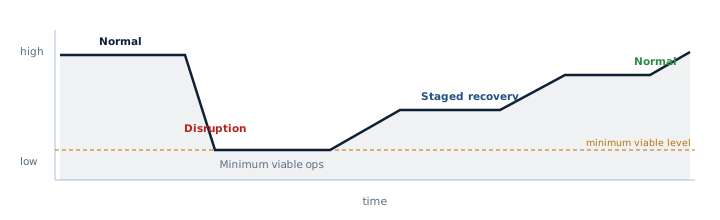
The toolkit includes a Minimum Viable Operations Worksheet so you can capture this for each critical service in advance, rather than improvising it at 08:00 on the worst morning of the year.
Manual workarounds and vital records
Most continuity plans contain the phrase “use manual processes” and then stop, as if that were a plan rather than a hope. It is not. A manual workaround only works if you have thought through how it actually runs and, crucially, how you put things right afterwards.
For every manual workaround, record the trigger, the owner, the forms or templates required, the information needed and where it comes from, the approval process, the maximum volume it can handle, any temporary security controls, and the reconciliation process for when systems return. That last one is where businesses come unstuck. If orders are written on paper while the ERP is down, someone has to enter them afterwards without creating duplicates, missing orders, wrong stock levels or double invoices. Plan the reconciliation, not just the workaround. The toolkit’s Manual Workaround Register captures all of this.
Vital records
Some information has to remain reachable even when your normal systems are not. Think about your continuity plan itself, key contacts, customer escalation details, insurer and policy information, building and landlord information, critical supplier contacts, recovery procedures, key contracts, employee contacts, banking escalation numbers and emergency technical information. Ask the awkward question: if your continuity plan lives only in Microsoft 365, how will you read it during a Microsoft 365 outage? Keep secure, access-independent copies of your vital records, without creating insecure copies of sensitive credentials. The toolkit includes a Vital Records Register to help you decide what needs offline access and how to hold it safely.
Communications during disruption
Continuity efforts fail surprisingly often not because the team cannot fix the problem, but because nobody knows what is happening. The recovery can be going well while customers assume the worst and staff invent their own version of events. Communication is a core continuity capability, not an afterthought.
Employees
What happened, where to work, which systems to use, what not to use, and when the next update is coming.
Customers
The service impact, any known timescales, the alternative process if there is one, and when they will hear more. Factual, not speculative.
Suppliers
The disruption you expect, your priority requirements, and any alternative arrangements.
Management
Impact, decisions taken, recovery status, and the next decision point. A short situation report, not a running commentary.
Alternative communications: plan them before you need them
All of that assumes you can still talk to each other. So ask the uncomfortable questions in advance. What if Teams is down? What if Microsoft 365 is down? What if the internet is down? What if the office phones are down? What if nobody can get into the building? You need at least one channel that does not depend on the systems you might lose: SMS, mobiles, a phone tree, an external conference bridge, an emergency status page hosted independently, an emergency mailbox on a separate platform where justified, and supplier hotlines. Set these up while everything is calm, because during a disruption you cannot use the broken channel to arrange the working one. The toolkit’s Alternative Communications Worksheet and Crisis Communication Pack cover both the channels and the messages.
Scenario playbooks
Capability-loss categories give you reusable plans, but it helps to walk through the specific ones you are most likely to face. Here is the shape of each. The toolkit turns these into printable response cards.
Premises unavailable
Whatever the cause, the sequence is the same: account for staff safety first, confirm you cannot access the building, invoke the plan, move to your alternative location or remote working, sort out equipment and access to records, reroute phones and post, tell customers, notify your insurer, consider supplier implications, and plan the return to site. Home working helps, but do not assume it solves premises loss on its own, because twenty people without laptops are still twenty people who cannot work.
Internet or telephony outage
Establish the scope (your equipment, or a wider provider incident), switch to your alternative connection such as a second circuit or 4G/5G, move to mobile working, reroute VoIP numbers, check which cloud services are still reachable, communicate status, and escalate against the provider’s SLA. If connectivity underpins your ability to trade, this is a scenario worth investing in failover for. Our business connectivity options cover diverse and failover circuits, though the planning matters more than the product.
Microsoft 365 or cloud outage
This is a continuity scenario, not a security one, and the distinction matters. If Exchange, Teams, SharePoint, OneDrive, authentication or a SaaS application is unavailable because of a provider outage, the questions are: how do staff communicate, what work can continue, which data is unavailable, what customer channels remain, how do staff know the official instructions, and what data changes will need reconciling later. Keep going on your alternative channels and manual processes until service returns. If instead you suspect a tenant compromise rather than a provider outage, that is a security incident: switch to your incident response plan to contain and investigate it.
Cyber incident (continuity view)
When a cyber attack causes the disruption, your business continuity plan answers one question only: how does the business keep operating. It does not contain, investigate or remove the threat, that is the job of your Incident Response Toolkit. On the continuity side, focus on minimum viable services, safe alternative communications, manual processes, staffing, customer commitments, finance controls and recovery priorities. The two plans run in parallel: one keeps the lights on, the other deals with the attacker.
Power or utilities loss
Safety first, then estimate the likely duration, understand your UPS and any generator limits, decide whether to relocate or send people home, manage the knock-on loss of internet and network, shut down equipment safely, protect anything perishable or production-critical, manage building access and communicate throughout.
Key supplier failure
Identify which of your products or services the supplier affects, check current stock or capacity, escalate to the supplier, activate a secondary supplier or alternative product, prioritise your own customers, understand your contractual position and manage the financial impact. Supplier continuity is a whole discipline; here the focus is continuity of supply, keeping your own operations running while you sort out the gap.
Staff shortage or key-person loss
Distinguish large-scale absence (weather, illness) from the loss of a single critical person. For the first, fall back on minimum staffing, deputies, cross-training and remote working. For the second, the answer is documentation and deputies prepared in advance, because you cannot cross-train someone during the emergency. Key-person risk is one of the most common and least-addressed single points of failure in a small business.
Server, data or IT system loss
At the business level, identify the affected processes, set the restore priority, use your workarounds, understand your data-loss tolerance (RPO) and recovery target (RTO), validate the backup before trusting it, restore in dependency order, and plan the reconciliation. For the technical backup and restore detail, see our Backup and Disaster Recovery Checklist rather than duplicating it here.
Recovery priority, order and the backlog nobody plans for
Everything cannot be Priority 1
If every service is critical, none of them is, and your team will freeze trying to do everything at once. The BIA exists to produce a real recovery sequence. A workable model, which you can adapt:
| Priority | Meaning |
|---|---|
| P0 | Safety and emergency obligations. Always first. |
| P1 | Services required within hours. |
| P2 | Services required within one business day. |
| P3 | Services tolerable for several days. |
| P4 | Services that can wait until core operations recover. |
Recovery order: sequence matters
There is little point restoring your ERP before the things it depends on are working. Identity, network, DNS, the database, licensing and client devices generally have to come back before the application that sits on top of them. Recovering in the wrong order wastes the very hours you are trying to save. The toolkit’s Recovery Dependency Map helps you work out the order in advance.
The backlog: restoring IT does not restore the business
Here is the phase almost every continuity plan forgets. When systems come back, the business is not instantly normal. There is a backlog: duplicated manual transactions to reconcile, a queue of customer queries, missed orders to chase, delayed invoicing, payroll adjustments, supplier orders to place and a pile of support requests. Treat “return to normal operations” as a planned phase in its own right, with someone owning the backlog, or the disruption quietly continues for days after the systems are fixed.
The business continuity plan itself
All of the analysis above feeds into one practical document. A usable SME business continuity plan contains: document control, scope, objectives and owner; activation criteria and authority; command roles and emergency contacts; priority services, recovery objectives and minimum viable operations; dependencies and continuity strategies; communications; scenario procedures; references to technology recovery, supplier and premises arrangements; vital records; plan stand-down and return-to-normal process; and the exercise schedule, maintenance and lessons learned. The toolkit’s plan template contains all of this with clear placeholders and guidance. The goal is a document a stressed manager can actually use at 07:45, not a seventy-page compliance artefact that impresses an auditor and helps nobody.
Four situations worth calling out
“We’re cloud-first, so we don’t need continuity planning”
This is one of the most common and most dangerous misconceptions, and July 2024 disproved it publicly when a single faulty software update took down millions of Windows machines worldwide, grounding flights and disrupting hospitals and banks, none of which had been attacked. Being in the cloud does not remove your dependencies, it changes them. A cloud-first business still depends on internet connectivity, identity, endpoints, the provider’s own availability, its SaaS suppliers, DNS, MFA, telephony, the ability to export and recover its data, and user access. Cloud shifts where your continuity risks live; it does not abolish them. If anything, it concentrates them in a smaller number of critical dependencies that are easy to overlook precisely because they usually just work.
Remote and hybrid organisations
Distributed working brings its own continuity questions: home broadband and power, laptop availability and distribution, authentication and security when everyone is remote, communications, staff welfare, and managers’ ability to coordinate a team they cannot see. Home working is a genuine continuity strategy for premises loss, but only if people actually have the equipment, connectivity and access to do their jobs from home, which is worth testing rather than assuming.
Supplier continuity
Your BIA should ask, for each important activity: which services rely on a single supplier, how long it would take to replace them, who owns the escalation relationship, whether the supplier has its own continuity plan, whether you have contractual recovery commitments, whether you have the rights and means to get your data out, and how you would exit if you had to. You do not need a full third-party risk programme to answer these, but you do need to have asked them before the supplier fails, not after.
People and welfare
Strong continuity planning is not only systems and spreadsheets. During an extended disruption, people are working under pressure, often long hours, sometimes anxious about their jobs or the business. Plan for safety first, realistic working hours and rotation, fatigue, clear leadership and honest communication. A team that is looked after recovers a business faster than one that is run into the ground. This is common sense, not medical advice, but it is the part of continuity planning that spreadsheets never capture.
Insurance, legal duties and the ISO question
Insurance
Understand your own policies before you need them. Business interruption cover, cyber insurance and property insurance all interact with a disruption, and many policies have conditions about notifying the insurer early and documenting the impact and recovery. Know your notification routes and evidence requirements in advance. We are describing how insurance fits continuity planning, not giving insurance advice; check your specific policy terms and speak to your broker.
Legal and regulatory requirements
There is no blanket legal duty on every UK business to hold a formal continuity plan. The Civil Contingencies Act places duties on emergency responders such as councils and utilities, not on general SMEs, so do not let anyone tell you the law requires your continuity plan. Real obligations, where they exist, come from your contracts, your sector’s regulation, customer requirements, insurance conditions, professional standards, data protection duties and supply-chain commitments. Some sectors face genuinely strong requirements; most SMEs face expectations from customers and insurers rather than statute. Use careful language and check what actually applies to you.
ISO 27001 is not ISO 22301
These get conflated constantly. ISO/IEC 27001 is the standard for information security management, and System Force IT is UKAS-certified to it. ISO 22301 is a different standard, specifically for business continuity management systems. Information security management includes some continuity thinking, but being certified to ISO 27001 is not the same as being certified to ISO 22301. This toolkit aligns with generally recognised business continuity principles and can help you work in that direction, but it does not provide ISO 22301 certification, and using it does not make your business ISO 22301 certified. Where you need formal certification, that is a separate, audited process.
Testing: a plan is not proven until you exercise it
A continuity plan is a set of assumptions until the day you test it, and untested assumptions have a habit of being wrong at the worst moment. You do not have to leap straight to a full simulation. There is a progression, and you build maturity by climbing it.
| Type of test | What you do |
|---|---|
| Discussion / tabletop | Talk through a scenario as a group. Cheap, low-risk, revealing. |
| Walkthrough | Physically verify procedures, contacts and resources exist and work. |
| Technical recovery test | Actually restore or recover real technology in a controlled way. |
| Communications exercise | Test the call tree and your alternative channels. |
| Partial simulation | Run a real process using its manual workaround. |
| Full exercise | Where proportionate and safe, exercise end to end. |
Measure your tests, do not just pass them
“Test passed” tells you nothing. Record what actually happened: how long activation took, how long decisions took, how long to notify staff, how long to reach minimum viable operations, how long systems took to recover, how much data was lost, what capacity the workaround could handle, the customer impact, and the issues you hit. Then compare the actual figures against your objectives. The gap between your RTO on paper and the time it really took is the most valuable output of any exercise.
The toolkit includes six tabletop exercises and an exercise report template. The NCSC’s free Exercise in a Box is another good, no-cost way to start.
Keeping the plan alive
Continuity plans go stale quietly, because the business changes and the document does not. A plan that describes last year’s office, last year’s phone system and a supplier you no longer use is worse than useless, because it gives false confidence. Review the plan, and the BIA behind it, whenever something material changes: a new office, a new application, a Microsoft 365 change, a new critical supplier, a merger or acquisition, significant staffing changes, a major network or telephony change, changed customer commitments, an incident, an exercise, or a significant new risk. The BIA is a business document to be maintained, not a project to be completed once. The toolkit’s Maintenance Schedule helps you keep it current without turning it into a burden.
Twelve questions your directors should be able to answer
A useful test of whether continuity is real in your business, rather than a document on a shelf. If your leadership cannot answer these, the plan is not yet doing its job. This section is designed to be printed and taken into a board meeting.
- What are our five most time-critical services?
- How long can each be unavailable before it really hurts?
- What does each of them depend on?
- What single points of failure do we have?
- What does minimum viable operation look like for us?
- Who can activate our continuity plan?
- How will we communicate if Microsoft 365 is unavailable?
- Which suppliers could stop us trading?
- Have our recovery objectives actually been tested?
- When did we last restore critical data, for real?
- When did we last exercise the plan?
- Which known continuity gaps are still unresolved?
Two worked examples
Priorities differ by business, so here are two short, fictional examples to show how the same method produces different answers. Both are illustrative and clearly fictional.
Example 1: a 50-person professional services firm
Its critical activities might include client communication, access to case and project files, invoicing, payroll and the line-of-business application, all running on Microsoft 365 plus a practice-management system. Running the BIA, client communication and file access turn out to be the most time-critical, because clients expect responsiveness and work stalls without the files, so both get a short RTO. Invoicing can tolerate a day or two. Payroll is time-critical only near pay dates, a good example of impact varying with timing. The firm’s minimum viable operation is: partners and fee-earners able to communicate with clients and reach live case files, with billing and reporting deferred. Its biggest single point of failure is identity: lose Microsoft 365 authentication and almost everything stops, so that is where its resilience spend goes first.
Example 2: a small manufacturer and distributor
Its critical activities might include order intake, production, stock control, dispatch, supplier ordering, finance and customer service, running on an ERP system, shop-floor equipment and a warehouse. Here the BIA produces a very different answer. Order intake and dispatch are the most time-critical, because customers expect same-day or next-day delivery and a missed dispatch window cannot be recovered. Production can sometimes buffer against short outages using existing stock. An ERP outage is serious but its consequences differ from the professional services firm: not “we cannot bill” but “we cannot pick, pack and ship, and we lose the day’s dispatches”. The manufacturer’s minimum viable operation involves taking and fulfilling urgent orders, possibly on paper, with reconciliation planned for when the ERP returns. Its single points of failure are the ERP and specific production equipment, and its continuity strategy leans on buffer stock, a documented manual dispatch process and an equipment maintenance arrangement. Same method, entirely different plan.
Download the free Business Continuity & BIA Toolkit
Sixteen editable templates, no email required: the BCP template, the BIA workbook, recovery-objectives and dependency registers, minimum viable operations and manual workaround worksheets, scenario playbooks, six tabletop exercises and more.
Not sure where you stand? Take the free 5-minute check
The Business Continuity Readiness Check asks about your governance, BIA, people, premises, IT, communications, suppliers, recovery and testing, and gives you an instant readiness level and your top actions. No sign-up, nothing stored.
Frequently asked questions
It is the practical plan a business uses to keep delivering its most important products and services when something it depends on becomes unavailable, whether that is people, premises, technology, data, suppliers or utilities. A good plan sets out priority activities, recovery objectives, who does what, how to reach minimum viable operations, and how to communicate, all decided in advance rather than improvised during a crisis.
Yes, and the smaller you are the more it helps, because you have less slack to absorb disruption. You do not need an enterprise document. A few well-thought-out pages covering your priority services, dependencies, minimum viable operations, contacts and workarounds will change the outcome of a real disruption far more than a thick plan nobody has read.
There is no blanket legal requirement for every UK business to have a formal continuity plan. The Civil Contingencies Act places duties on emergency responders such as councils and utilities, not on general SMEs. Real obligations, where they exist, usually come from contracts, sector regulation, customer requirements, insurance conditions or professional standards rather than statute. Check what actually applies to your business.
A BIA is the structured analysis that works out which of your activities matter most, how the impact of losing each one grows over time, which to recover first, and what they depend on. It is the foundation of a credible continuity plan, because it replaces guesswork with a defensible recovery order. You do the BIA before you write the plan.
A BIA asks what happens if an activity is unavailable, regardless of the cause. A risk assessment asks what could cause it to become unavailable, and how likely and controllable that is. You do the BIA first, because it tells you which activities are worth assessing risks for at all. They are complementary, not the same thing.
Disaster recovery is primarily about restoring technology, systems and data. Business continuity is much broader: it is about keeping the whole business delivering its priority services during any disruption, including people, premises, suppliers and communications, not just IT. Disaster recovery restores the server; business continuity keeps the business trading while the server is down.
RTO, the recovery time objective, is how quickly a service or system needs to be restored to an acceptable level. RPO, the recovery point objective, is how much data you can tolerate losing, measured backwards in time. RTO is about time to restore; RPO is about acceptable data loss. Quoting one when you mean the other is a common and expensive mistake.
Broadly, it is the point at which a disruption becomes unacceptable to the business, after which the damage may be irreversible. Terminology varies between frameworks, so avoid false precision. The practical use is that your recovery time objective should sit comfortably before that point, giving you a margin rather than cutting it fine.
Minimum viable operations, a term used by the NCSC, is the lowest level of operation at which your organisation can keep going safely, meet its legal and regulatory obligations, and maintain trust with customers, partners and staff. During a serious disruption you aim to reach MVO first, then build back up to normal, rather than trying to restore everything at once.
Review it whenever the business changes materially, such as a new office, application, supplier or major staffing change, and at least periodically otherwise. Test it at a frequency that matches your risk: for most SMEs a tabletop exercise once or twice a year, plus a real backup-restore test, is a sensible floor, with a review after any incident or exercise.
If it is a provider outage, this is a continuity scenario: use your alternative communications and manual processes to keep priority work going, tell staff and customers, note what data changes will need reconciling later, and wait for service to return. If instead you suspect your tenant has been compromised, treat it as a security incident and switch to your incident response plan. Distinguishing outage from compromise early matters.
Yes, at least a copy. If your plan lives only in Microsoft 365 or on a network drive, you cannot read it during a Microsoft 365 outage or a network failure, which are exactly the moments you need it. Keep a secure, access-independent copy of the plan and your vital records, without creating insecure copies of sensitive credentials.
In your BIA, identify which activities rely on a single supplier, how long it would take to replace them, who owns the escalation, whether the supplier has its own continuity plan, and whether you have alternatives, buffer stock or the right to get your data out. The goal is continuity of supply: keeping your own operations running while you close the gap.
No. The toolkit aligns with generally recognised business continuity principles and can help you work in that direction, but it does not provide ISO 22301 certification, and using it does not make your business certified. ISO 22301 certification is a separate, audited process. Note too that System Force IT’s ISO/IEC 27001 certification is for information security, which is a different standard from ISO 22301.
Further authoritative guidance
This guide interprets recognised UK guidance and standards for a smaller business. For the primary material:
- GOV.UK, National Risk Register 2026
- NCSC, recovering to minimum viable operations after a disruptive incident and the free Exercise in a Box
- ISO, ISO 22301 business continuity management systems
Related in-depth guides
- Business Impact Analysis: A Complete Guide for UK SMEs, on how to work out what to recover first and how fast.
- RTO vs RPO Explained: How to Set Realistic Recovery Objectives, on the two objectives and how to set targets you can actually meet.
Learn it as a team
Join a free System Force webinar and run a live business impact analysis and tabletop with your people.
Want a second opinion?
We can review your continuity and recovery assumptions and give you a plain, prioritised list of gaps.
Stay one step ahead of the threats
Get our free weekly IT and cyber security briefing for UK businesses. The same threat and policy round-up we send our own clients, straight to your inbox. No spam, unsubscribe any time.
Get the free weekly briefing →

